This website uses cookies to provide the best possible functionality. Learn More.
Software Localization Made Simple — for Applications, Documents, and Data
Cloud and Desktop — together, or on their own.
Soluling makes it easy to create and maintain multilingual software, documents, and data — whether your team translates with the Soluling Desktop application or right in the browser with Soluling Cloud.
Add Soluling to your development process, and it fits right in, whether you follow continuous localization or waterfall localization - see Workflows for ways to combine its tools to fit your team.
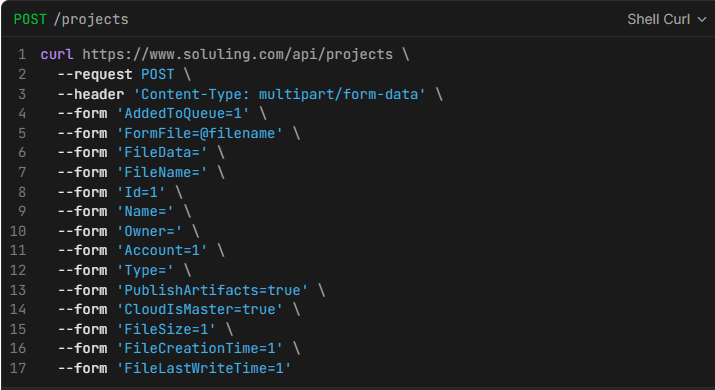
Automate scanning, building, and translating with the SoluMake command-line tool, or push files to the cloud through the REST API or the SoluCLI command-line tool, so it fits right into your CI/CD pipeline instead of needing someone to run it by hand.
Because scanning and building both can also happen locally, on your own build server or development machine, you never need to send your source files to Soluling or give it access to your repo.
Soluling Cloud
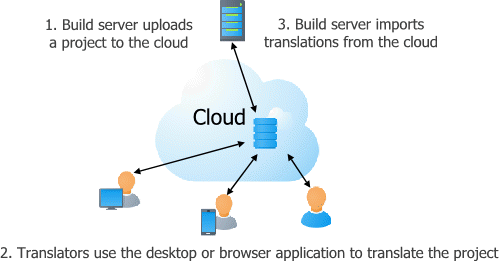
Scan and build locally in your CI/CD pipeline or on your development machine, then translate in the cloud.
Or push your files to Soluling Cloud, where they are scanned, translated, and built.
Never break the code you're translating: Placeholders and format codes ({0}, %s, HTML tags) are visually protected as "chips" — translators can see and reorder them, but can't accidentally delete or corrupt them.
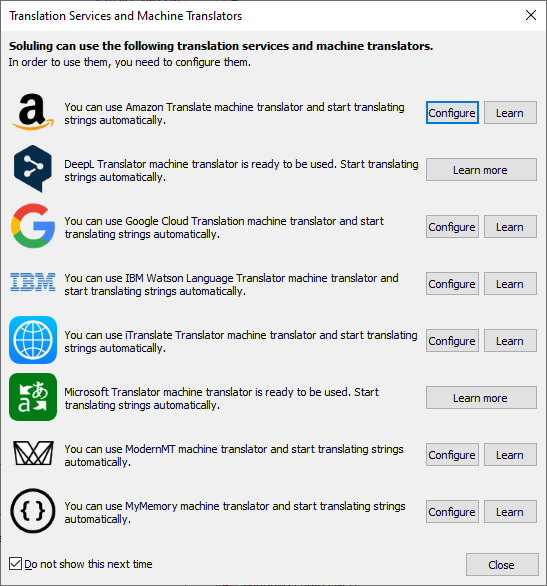
Translate faster and better with built-in AI-powered features.
One click surfaces suggestions from both AI/Machine Translation and your Translation Memory side-by-side — when multiple MT engines agree, they're shown as a single "all engines" suggestion instead of clutter.
Real-time spell checking as you type, with suggestions and project-specific custom dictionaries.
Real-time translation quality checking with easy one-click fixing.
Built for team workflows, not just individual translators.
Soluling API
Full REST API (JSON) covering everything browser and Web Translate do — projects, rows, translations, plural forms, languages, and more.
Don't want to write the HTTP calls yourself? SoluCLI wraps the API in a ready-made, cross-platform command-line tool — push resource files, trigger builds, and pull localized files back, installable straight from npm.
Script uploads, translations, and exports straight into your CI/CD pipeline — no manual packages, no waiting on someone to click through a workflow.
Run spell checking against project-specific dictionaries as an automated QA step in your pipeline.
Bearer-token or basic authentication — fits whatever auth flow your systems already use.
Self-documenting via OpenAPI/Swagger, so you can explore and test every endpoint before writing a line of integration code.
Scan your files locally on your build server or development machine — no need to send source code to a localization service or to give a localization service access to your repo.
When scanning, Soluling completely decouples strings from your files, letting translators and developers work simultaneously.
You can push your project to Soluling Cloud so your translators can translate it right in the browser with Soluling Web Translate — no manual packages to send back and forth.
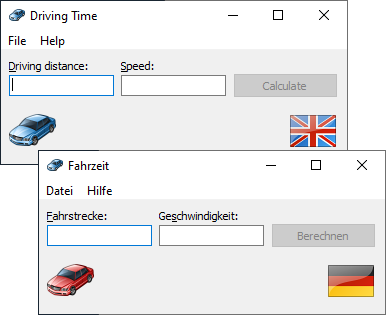
Soluling lets you localize everything: strings, layout, images, colors, etc.
Soluling has visual editors that show the original and localized UI in real time.
Soluling knows even the most complex resource formats. No need to limit yourself to a simple format like JSON.
Soluling knows the project file formats. For example, instead of selecting dozens of .resx, .xaml, and/or .rc files, you only select one file — a .csproj, .vbproj, .sln, .exe, or .dll.
During your build process, Soluling creates up-to-date resource files and injects translations into them.
Output files that Soluling creates are ready to be deployed.
Terminology support with stemming. Soluling highlights those words that exist in the termbase. Click a highlighted word to get a translation and copy to the translation field.
Excellent support for grammatical numbers (e.g., singular and plural) and grammatical genders (e.g., masculine, feminine, and neuter).
Real-time and batch translation validation powered by AI: Soluling automatically finds the errors as you type and can even fix them.
Soluling Cloud keeps projects centralized, so multiple translators can work on the same project at the same time instead of waiting on packages sent back and forth.
Shared Translation memory and Terminology in the cloud mean every translator sees the same suggestions and highlighted terms, keeping quality consistent across the whole team.
Over-the-air (OTA) delivery pushes finished translations straight to your applications through a CDN, without a redeploy — speeding up how fast translations actually reach your users.
"We've been using Soluling since its beginnings for the translation of our ERP software, which runs in a number of languages. Soluling makes it possible to split the translations on the corporate level into separate language-specific projects, making it translator-friendly and more secure on the master level. As Soluling enables plenty of other features, we have recently started using it for documentation as well. Jaakko is extremely responsive, quick at improving features and always ready to help if needed. We are very satisfied Soluling customers."
"We have used Soluling for many years because it’s the most versatile localization tool available, with perfect adaption to our favorite development tool Embarcadero Delphi. Our customers can easily translate our software to their language using a special translation tool."
Manuel MATA PASTOR Freelance localizer and postgraduate lecturer at several European Universities
"I have been using Soluling in my postgraduate courses for several years. It has every feature one could expect in a localization tool to accomplish typical tasks in any localization project, from straightforward project setup to QA. Its file filter collection is impressive: Soluling deals with web content, apps and software resources in all popular formats. I could not do without it anymore, and my students love it!"